![Ivet-Logo_1.png]](https://trainerportal.ivet.edu.au/hs-fs/hubfs/Ivet-Logo_1.png?height=45&name=Ivet-Logo_1.png)
This article is organised into four sections to help you resolve access issues step by step.
You can use the links below to navigate directly to the section you want to view:
- How to Log In to the IVET Portal
- How to Troubleshoot Common Login Issues
- How to Reset Your Password
- How to Contact IVET for Support
1. How to Log In to the IVET Portal
When accessing the Portal for the first time, you’ll receive an email asking you to create a password for your account. Click the link in the email to set your password.
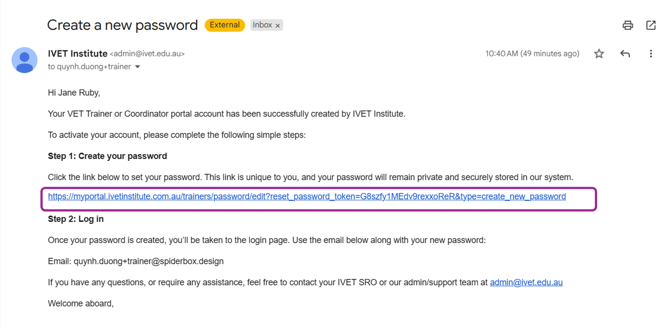
For future logins, use these login details to access the Portal by following the instructions below.
1.1) You can access the login page in two ways:
a) Open your internet browser and navigate to https://myportal.ivetinstitute.com.au/
It’s important to select the correct role when logging in.
If you have a Trainer-only role, make sure you choose to log in as a Trainer.
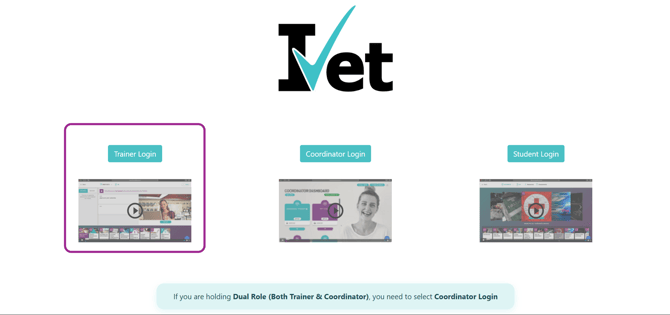
b) Alternatively, you can go to our website https://www.ivetinstitute.com.au/ and select Portal Login from the top-right corner.
From the dropdown menu, choose Trainer if you have a Trainer Only role.
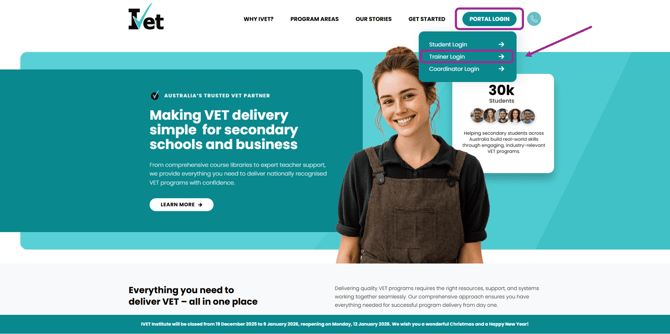
If you have a Coordinator Only or Dual (Both Trainer and Coordinator) role, select Coordinator when logging in and follow the Coordinator login guide below: How to Log In & Troubleshoot Password Issues as Coordinator or Dual Role (Both Trainer & Coordinator)
1.2) Once you have clicked on the Trainer Login button, you will be redirected to this screen, where you will need to enter your email and password:
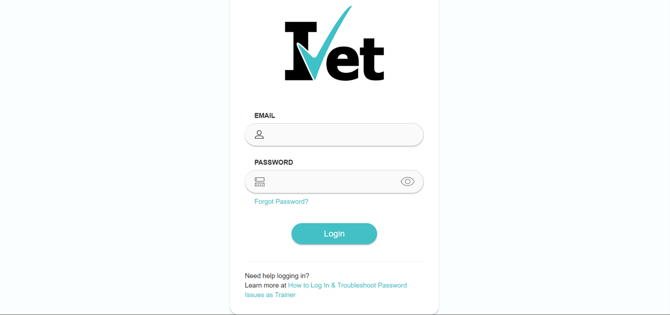
Click the eye icon next to the password field to reveal your password and confirm it has been entered correctly.
2. How to Troubleshoot Common Login Issues
If you’re having trouble logging in, the tips below may help resolve the issue:
- Ensure you are using Google Chrome or Firefox. Outdated or non-compatible internet browsers can prevent you from logging into the Portal.
- Double-check your login details as provided in your welcome email for any spelling mistakes or incorrect characters.
- Check the password you are using and ensure you don’t have Caps Lock on when it doesn’t need to be.
- Ensure you are selecting the correct option to log in. On the login page, it will provide you with options to log in as a Coordinator, Trainer, or Student. If you have roles as both Coordinator and Trainer in our system, it's important to note that you need to log in to the Portal as a Coordinator to access your Coordinator tools and information.
- Try clearing or deleting your browser history including your ‘cached’ files and media. You can visit this website for further instruction: Clear cache & cookies
- If you are continually receiving the logged-out error message, it may be an issue with the computer clock and time zone not matching the State you are located in.
3. How to Reset Your Password
If you’re still unable to log in after trying the steps above, a password reset may be required.
In line with our security policy, we're unable to access or reset your password for you. Please follow the simple steps in the guide below to reset your password.
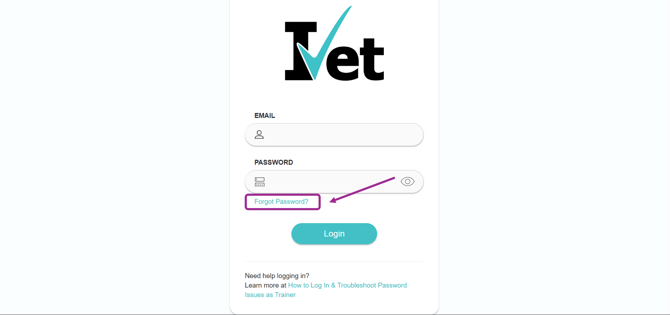
3.1) First, click on the Forgot Password? link below the Password box.
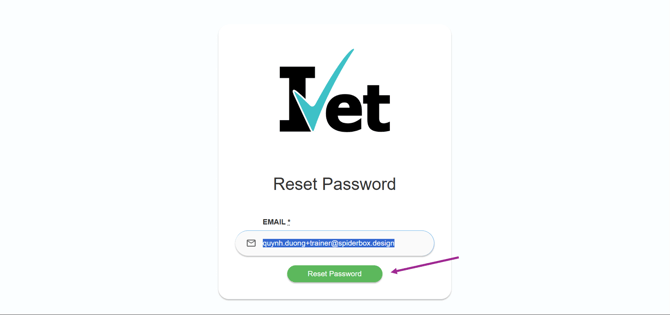
3.2) Next, enter the email address associated with your account, which will receive the password reset link. Then click on the Reset Password button.
3.3) The password reset link will be sent to your email address. If you don’t see the email, be sure to check your spam or junk folder. Click the Change my password link to set a new password.
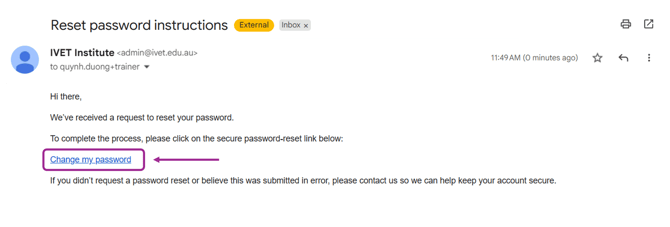
The password reset link may expire after a period of time. If this happens or you don’t receive the email, simply click the Reset Password button again to request a new link.
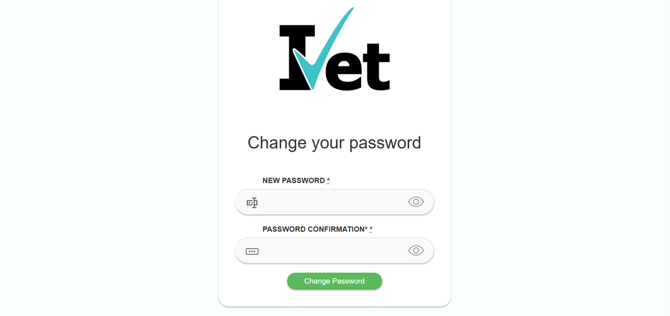
3.4) Enter your new password, confirm the password, and click the Change password button to complete the process.
4. How to Contact IVET for Support
If you’re still unable to log in or resolve your password issue after following the steps above, please contact IVET for further assistance.
You can email us at admin@ivet.edu.au or call 1300 000 823, and our Customer Service Officers will be happy to assist you.